A home in order starts here.
Your family's bills in one place — who pays what, with nothing forgotten. One person adds a bill, everyone keeps up, and Bills42 reminds you before it's due.
Free for one home. Available on the App Store; coming soon to Google Play.
Everyday life
Made for people who share a life — and the bills
Water, electricity, internet, the car in 10 installments. In every home someone asks "did you pay that?". Bills42 puts an end to that question.
One person adds it, everyone sees it
Whoever likes organizing puts the bills in the app and invites the family by email. The others just tap the link — the bills appear on their phone instantly, nothing to type.
Reminders before due dates
Whoever is responsible for a bill gets reminded days in advance. If the day arrives and nobody paid, the whole home is alerted — no one pays late fees over a slip of memory.
Who paid, when, and how much
Anyone in the home can mark a bill as paid — even on someone else's behalf. Who paid, when, and the amount are all recorded in a simple monthly history.
How it works
Three steps and your home is in order
Add your bills
One-time, monthly, or in installments — "10 payments of $530.00" just as you know it, with upcoming installments calculated instantly.
Invite your family
One email invite and done: they sign in with their Apple or Google account and see everything synced, in real time.
Let the app remember
Choose who pays each bill and how many days in advance to remind them. We handle the rest — including the last-minute alert to everyone.
Features
Simple on the outside, complete on the inside
Bills by urgency
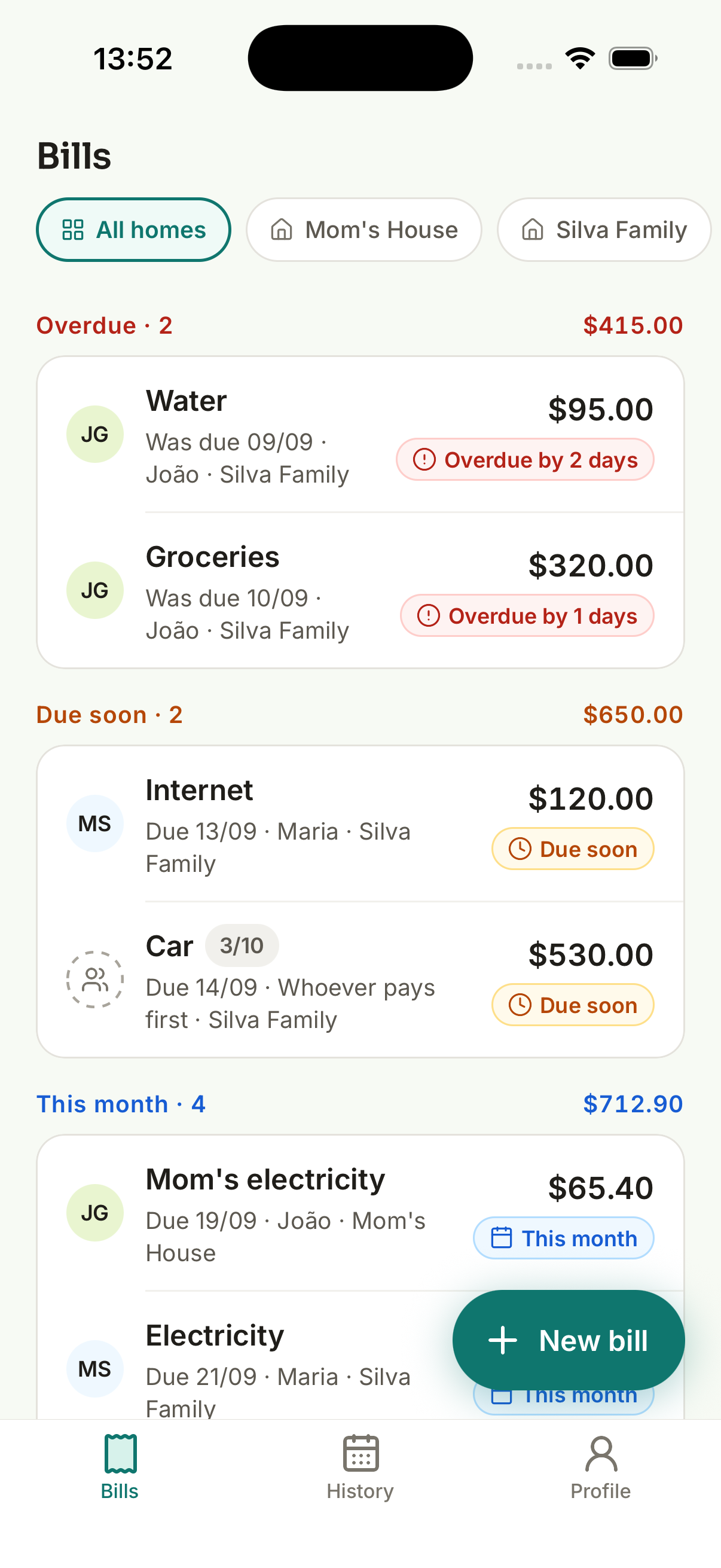
Overdue first, then what's due soon, then the rest of the month — with a total for each group. You grasp the home's situation at a glance.
Real installments
The car in 10 payments shows up as "installment 3 of 10", with a progress bar. Monthly bills renew themselves when you pay.
Monthly history
How much the home paid in a month and how much each person contributed. Browse previous months whenever you need to check something.
No hierarchy
Your home has no "admin": everyone adds, edits, and pays equally. Transparency comes from the record, not from permissions.
In three languages
Português, English, and Español — the app follows your phone's language, and you can switch anytime.
Works offline
Add bills and mark them paid even without a connection. When you're back online, everything syncs for the whole family.
FAQ
What people ask most
Do I need to create a password?
No. You sign in with your Apple or Google account — no new password to remember, and we never store any password.
Does the other person need to be tech-savvy?
No. They get an email invite, tap the link, sign in with Apple or Google, and that's it: all the home's bills appear on their phone, nothing to type.
Does Bills42 make payments or access my bank?
No. Bills42 organizes and reminds — you pay wherever you prefer (bank, card, transfer). The app never asks for bank access and never processes bill payments.
What if two people mark the same bill as paid?
Only the first one counts. The second person sees a friendly note that the bill was already paid — nothing is charged or recorded twice.
How much does it cost?
The app is free for one home, with discreet ads. Bills42+ is a monthly subscription renewed through the App Store or Google Play, cancellable anytime through the store.